
AIM MXS 1.3 Strada Review — Is a Real Motorsport Digital Dash Worth It for Sim Racing?
TL;DR
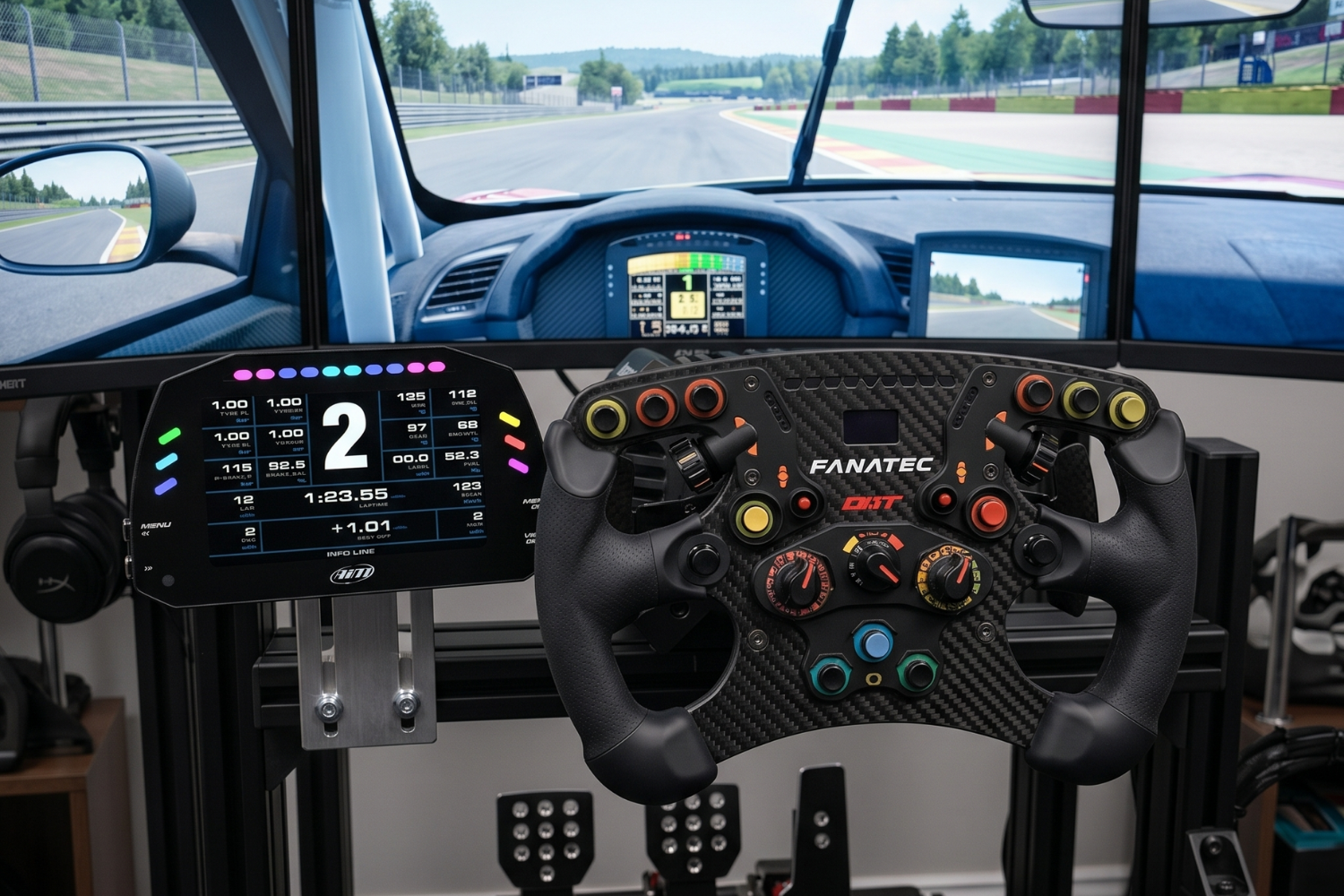
The AIM MXS 1.3 Strada is a 5-inch professional motorsport digital dash display used in real circuit racing, adapted for sim racing use via USB connection and SimHub compatibility. At £1,236 from SimTorque it is a significant purchase — but nothing in the consumer sim racing market delivers the same combination of display quality, real motorsport instrumentation and the genuine feeling of looking at the same data output a racing driver uses. If your sim rig is at a level where the dashboard is the last thing that still feels like a gaming product, the AIM MXS resolves that immediately. Verdict: 9/10
What is the AIM MXS 1.3 Strada?
AIM Technologies is an Italian manufacturer of motorsport data acquisition, instrumentation and display equipment. Their products are used from club racing to professional GT and touring car championships worldwide. The MXS 1.3 Strada is their 5-inch TFT digital dash display — part of the MX series that brings professional motorsport instrumentation to road and track use.
The Strada designation indicates this is the road and track variant rather than a full race-configured model with onboard data logging. For sim racing, this is the relevant configuration — the logging capability of professional race variants is not needed, and the Strada's USB connectivity and SimHub compatibility make it directly usable with a sim racing PC.
The MX series range covers four screen sizes. The MXS is the smallest at 5 inches, the MXP is 6 inches (£1,338), the MXG is 7 inches (£1,542) and the MXT is 10 inches (£1,746). All are available from SimTorque with free UK delivery.
Specifications
Screen size — 5 inches TFT Resolution — 800 x 480 pixels Connectivity — USB for sim racing use SimHub compatibility — Yes, via AIM SimHub plugin Data displayed — Speed, RPM, gear, lap times, sector splits, tyre temps, fuel, DRS, warnings and more Weight — 290g UK price — £1,236 from SimTorque
Display Quality
The MXS's 5-inch TFT screen is immediately impressive in person. The resolution, brightness and contrast ratio are well above anything in the consumer sim racing dash market. At racing brightness settings the display is clearly readable in any ambient lighting condition — whether racing in a dark room or with natural light coming in behind the monitor.
The screen anti-glare coating is effective and the viewing angle is wide enough that the display remains readable even when mounted at a slight angle in a sim cockpit. The physical casing is machined aluminium — a material choice that reflects professional motorsport equipment rather than consumer electronics.
AIM's display layouts are configurable through their Race Studio software. Multiple pages can be set up and switched during a session, with different data on each page. For sim racing, a typical configuration might show RPM bar, speed, gear and lap delta on the primary page and tyre temperatures, sector times and fuel on secondary pages.
SimHub Setup and Compatibility
Connecting the AIM MXS to a sim racing PC requires the AIM SimHub plugin — available free from the SimHub plugin repository. Installation involves connecting the MXS via USB, installing the plugin and selecting AIM as the output device in SimHub's dashboard settings.
The process is well-documented in the SimHub community. Once connected, the MXS receives telemetry from SimHub and displays it in real time. The display updates are smooth and responsive — latency is not perceptible during normal racing.
Game compatibility is determined by SimHub's game support rather than the AIM display itself. All major sim racing titles — Assetto Corsa, ACC, iRacing, rFactor 2, Dirt Rally 2.0 and others — are supported through SimHub. If SimHub supports a game, the AIM MXS will display data from it.
Which AIM Display Size Should You Choose?
The 5-inch MXS is the right choice if your cockpit has limited space for a dedicated display or if you prefer a compact, integrated look. The display is large enough to read gear, RPM and speed clearly at a glance without being so large that it competes visually with your main monitor.
The 7-inch MXG (£1,542) is the most popular choice for sim racers who want the full data layout readable without squinting. The 10-inch MXT (£1,746) is for large multi-monitor setups where a small display would be lost visually.
View the full AIM Technologies range at SimTorque — https://simtorque.co.uk/collections/aim
Is It Worth £1,236?
For sim racers whose setup is already at a high level — direct drive wheelbase, load cell pedals, motion platform, proper racing seat — the AIM MXS is the logical next step for a dashboard that matches the standard of everything else in the rig. Nothing in the consumer sim racing dash market comes close to the display quality, the physical quality or the motorsport authenticity of the AIM MX series.
If your rig is at an earlier stage, invest in the platform, seat and peripherals first. The AIM display is the finishing touch on a serious setup, not the starting point.
View the AIM MXS 1.3 Strada at SimTorque — https://simtorque.co.uk/products/aim-mxs-13-strada-5-non-logging-digital-dash-display
FAQ
Does the AIM MXS work without SimHub? The AIM MXS can function as a standalone display with AIM's own Race Studio software, but for sim racing use SimHub is the recommended approach. SimHub provides the game compatibility and data routing that makes the display useful across a range of sim titles.
Is the AIM MXS plug-and-play for sim racing? Near plug-and-play. The USB connection is straightforward and the SimHub plugin installation takes around 15 minutes. Configuring the display layout to your preferences takes longer but is well-documented in the community.
Can I display tyre temperatures and fuel on the AIM MXS? Yes — any telemetry data that SimHub can receive from a supported game can be displayed on the AIM MXS. This includes tyre temperatures, fuel levels, damage, lap delta, sector times and more depending on what the game outputs.
What is the difference between the AIM MXS and MXP? The MXP is the 6-inch version of the same display — slightly larger screen, same connectivity and SimHub compatibility, priced at £1,338. The choice is primarily about the screen size that suits your cockpit layout.
Is free UK delivery available on AIM displays from SimTorque? Yes — all AIM Technologies displays at SimTorque include free UK mainland delivery.