
Best Digital Dash Display for Sim Racing — The Honest Buying Guide
TL;DR
The best digital dash displays for sim racing in 2026 are from AIM Technologies — the MX series brings professional motorsport instrumentation to sim rigs via USB and SimHub. The right model depends on your screen size preference and budget: the MXS (5 inch, £1,236) for compact setups, the MXG (7 inch, £1,542) for the most popular choice, and the MXT (10 inch, £1,746) for large multi-screen rigs. All are available from SimTorque with free UK delivery.
Why Your Sim Racing Dashboard Matters More Than You Think
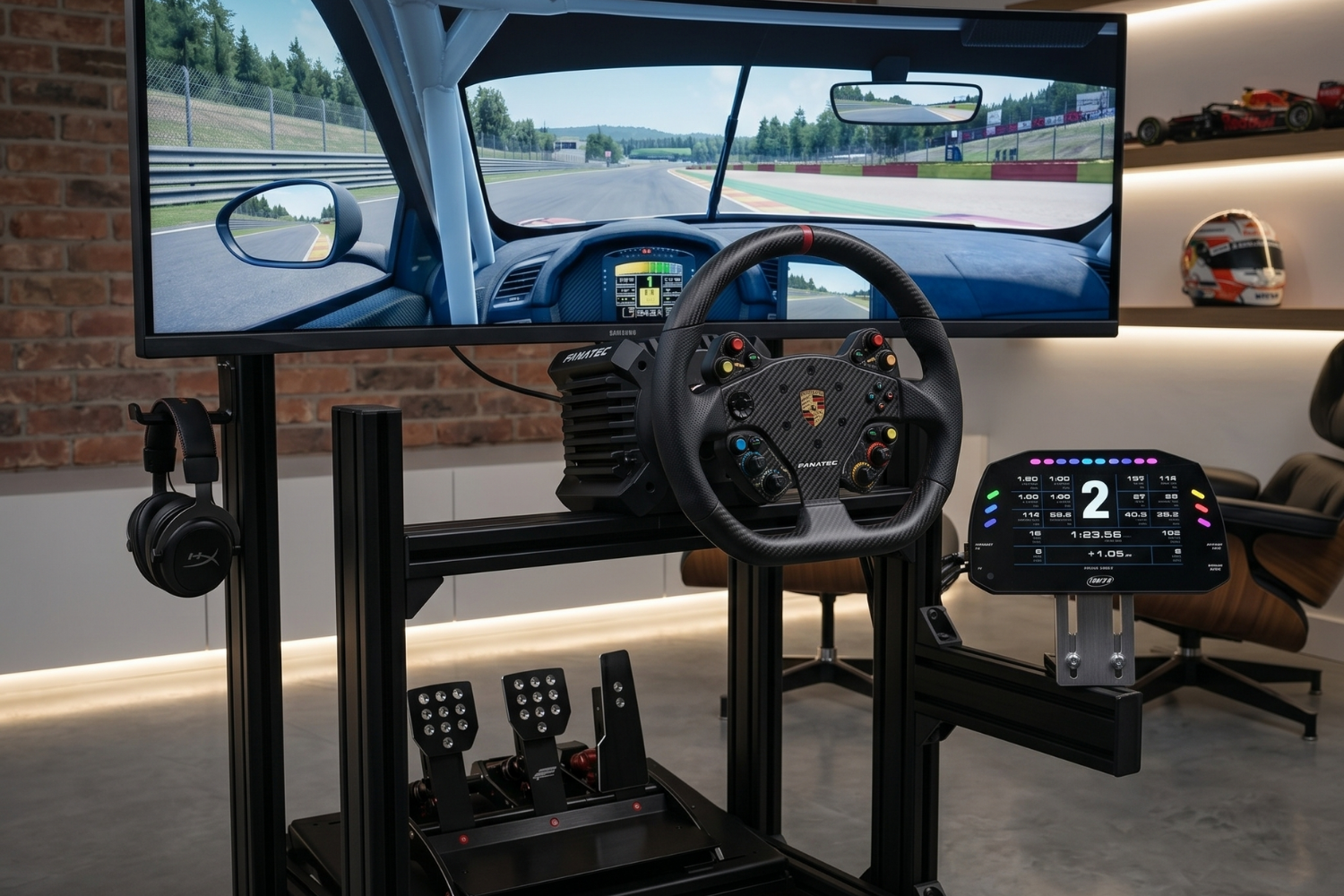
The digital dashboard is the information layer between you and the simulation. RPM, gear, speed, lap delta, tyre temperature, fuel — all of the data that informs your decisions during a race session comes through the dashboard. Most sim racers use an on-screen overlay for this information — a software widget displayed on the main monitor. It works, but it competes for visual attention with the driving view and it looks nothing like what a racing driver actually sees.
A dedicated physical dashboard changes this in two important ways. First, it moves the data off your main monitor entirely — your driving view is uncluttered and you can reference the dashboard with a glance down, exactly as a real driver does. Second, a quality physical display with real motorsport engineering behind it communicates data more effectively than an on-screen overlay.
For sim racers who have invested significantly in a high-quality rig, a genuine motorsport digital dash is the logical completion of the setup.
Why AIM Technologies Is the Right Brand
AIM Technologies is the benchmark for motorsport data acquisition and display equipment. Their products are found in professional GT racing, touring car championships, endurance racing and club motorsport worldwide. The MX series is their range of digital dash displays — professional instrumentation adapted for road, track and sim racing use.
For sim racing specifically, the AIM MX series connects via USB and is fully compatible with SimHub — the leading sim racing telemetry software. Through SimHub, the AIM display receives real-time telemetry from your sim title and displays it on a screen that is visually and physically indistinguishable from what professional racing drivers use.
There is no consumer sim racing dashboard that delivers the same display quality, build quality or motorsport authenticity as the AIM MX series. If you want the genuine article, AIM is the only choice.
The AIM MX Series — Which Size Is Right For You?
AIM MXS 1.3 Strada — 5 inch — £1,236
The MXS is the entry point to the AIM MX range and the most compact option. At 5 inches, the display is large enough to clearly read gear position, RPM bar and speed at a glance without requiring a large mounting footprint in the cockpit.
The MXS is ideal for sim racers with tighter cockpit mounting space, those who prefer a cleaner minimal look, or setups where a smaller display integrates more naturally with the rig's proportions.
View the AIM MXS at SimTorque — https://simtorque.co.uk/products/aim-mxs-13-strada-5-non-logging-digital-dash-display
AIM MXP 1.3 Strada — 6 inch — £1,338
The MXP is the next step up — a 6-inch display offering a slightly larger canvas for data layout without a significant jump in physical size. For sim racers who find the MXS borderline for comfortable reading at normal cockpit distances, the MXP is the natural alternative.
View the AIM MXP at SimTorque — https://simtorque.co.uk/products/aim-mxp-13-strada-6-non-logging-digital-dash-display
AIM MXG 1.3 Strada — 7 inch — £1,542
The MXG is the most popular choice in the AIM range for sim racing. The 7-inch display provides enough screen area to show a full data layout — RPM bar, speed, gear, lap delta, sector splits and warnings — without squinting, while remaining compact enough for most sim cockpit mounting solutions.
If you are undecided between MXS and MXG, the MXG is the one most sim racers who have used both would recommend. The additional screen area makes data reading under pressure noticeably easier.
View the AIM MXG at SimTorque — https://simtorque.co.uk/products/aim-mxg-13-strada-7-non-logging-digital-dash-display
AIM MXT 1.3 Strada — 10 inch — £1,746
The MXT is the largest display in the AIM range. At 10 inches, it suits triple monitor and large-scale rig setups where a smaller display would be visually insignificant relative to the overall cockpit. The MXT is also the display of choice for sim racers who want to show the most data simultaneously — a larger screen area allows for more complex page layouts without compromising readability.
View the AIM MXT at SimTorque — https://simtorque.co.uk/products/aim-mxt-13-strada-10-non-logging-digital-dash-display
What to Consider Before Buying
Cockpit mounting. Before selecting a display size, measure the available mounting space in your cockpit. Most sim racers mount the AIM display between the steering wheel and the main monitor — the mounting depth, width and height available in that space determines which size fits cleanly.
SimHub. All AIM MX displays require SimHub for sim racing use. SimHub is free software with excellent sim racing game support. If you are not already running SimHub, download and familiarise yourself with it before the display arrives — the setup will be faster.
Budget. All four displays are available at SimTorque with free UK delivery. The MXS at £1,236 is the right entry point if budget is a consideration. The MXG at £1,542 is the recommendation if budget allows — the additional display area is consistently valued by sim racers who have used both.
View the full AIM Technologies range at SimTorque — https://simtorque.co.uk/collections/aim
FAQ
Do AIM displays work with all sim racing games? Compatibility is determined by SimHub's game support. All major titles — ACC, Assetto Corsa, iRacing, rFactor 2, Dirt Rally 2.0, F1 series — are supported. If SimHub supports the game, the AIM display will receive telemetry from it.
Is SimHub free? SimHub is free for basic use. A donation unlocks additional features but the core functionality required for AIM display integration is available on the free version.
Can I use an AIM display without a motion platform? Yes — the AIM displays work independently of motion simulation. They connect via USB to your PC and receive data from SimHub regardless of whether you have a motion platform or a static rig.
What mounting solutions are available for AIM displays in a sim rig? Various third-party sim racing dashboard mounting brackets are available online. AIM also produces their own mounting hardware. The display includes standard VESA and AIM-specific mounting points.
Is free UK delivery included on all AIM displays at SimTorque? Yes — all four AIM MX displays include free UK mainland delivery from SimTorque.